
Question
How do you import rules into the Dimension Control setup
Answer
You will need to ensure that you have already setup Groups and Items.
Once these are setup you are free to create the import file on Excel
The file would look like this;
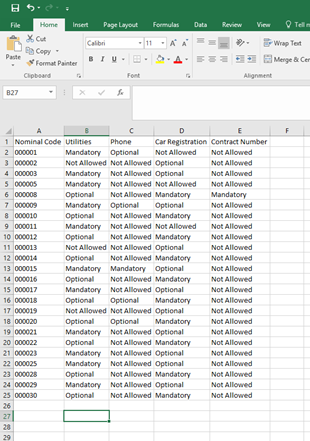
This has the Nominal Code that the items will possibly go to.
Then each column afterwards is each Group set on the system.
You will see that there are three different fields; Mandatory, Optional, Not Allowed
Mandatory - If this nominal code is used, an item from this group MUST be used
Optional - If this nominal code is used, you will be able to add an item but can continue without adding this
Not Allowed - Will simply leave this nominal code from being added to the group rules
Once this has been set up with all of the Nominal Codes you wish to use and all fields filled in this then needs to be saved as a csv file and imported on the following screen;
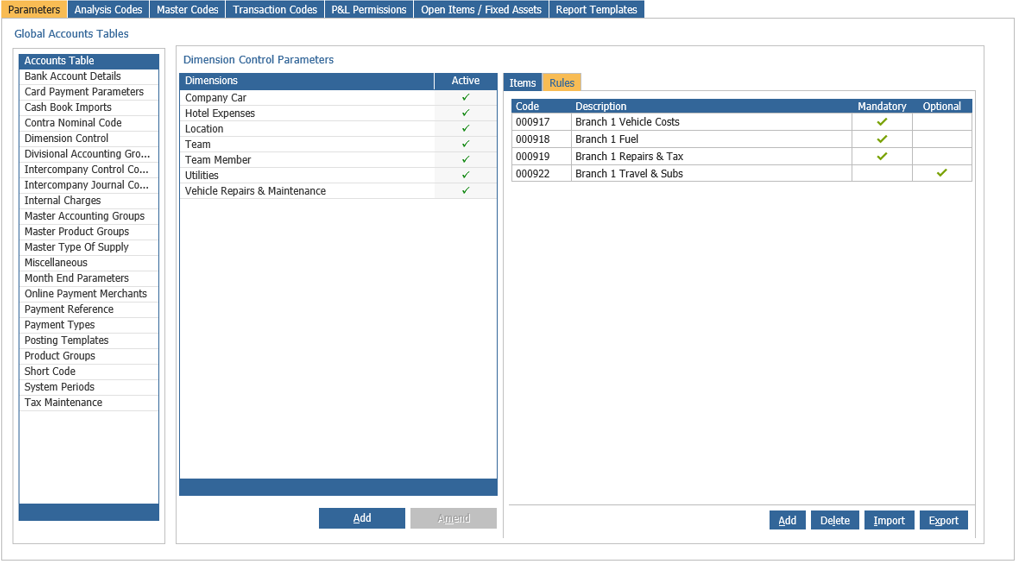
This is located by going to Accounts - Nominal Ledger - Ledger Parameters - Dimension Control - Rules tab
Then simply hitting the Import button and finding the location of the saved csv file that you created.