
Question
How would you create a new Master Accounting Group?
Answer
Within Nominal Ledger Parameters, Master Accounting Groups must be created to facilitate the
completion of code mapping of the Divisional Accounting Groups.
Accounting Groups are used as an additional filter in Debtor and Creditor reports, Transaction,
Turnover and Payment Due Reports, Statements and Remittances.
Each Accounting Group has its own set of nominal codes which enables easier interpretation of debt and credit types when viewing the balance sheet.
To create a new Master Accounting Group navigate to:
Accounts > Nominal Ledger > Ledger Parameters > Master Accounting Group (in the Accounts Table)
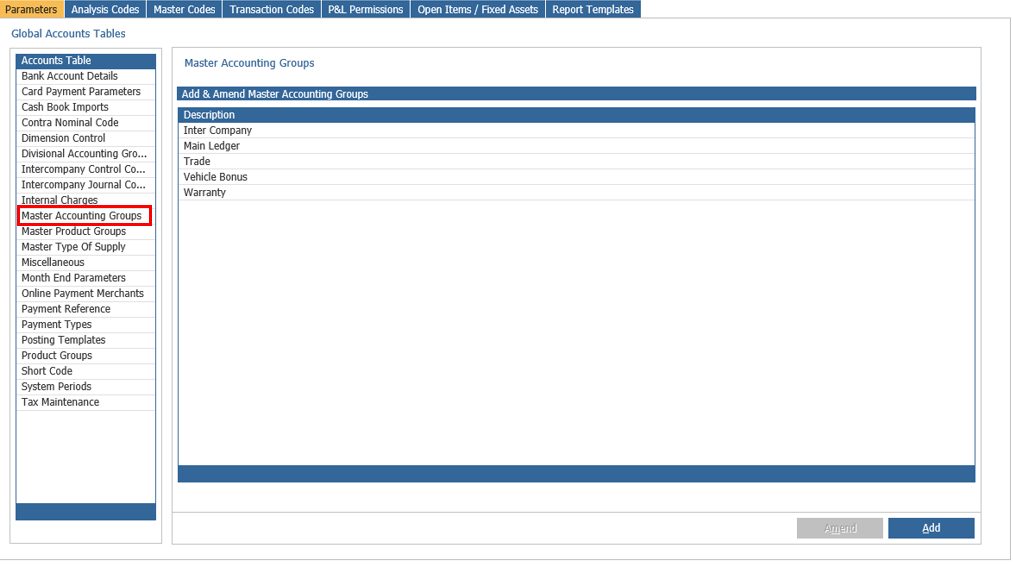
Click Add in the bottom right hand corner, enter your description as shown in the image below:
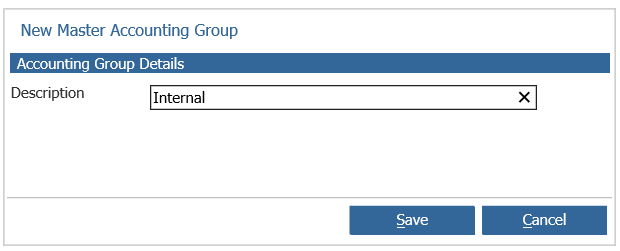
Click Save and then this will show as an Accounting Group in both Divisional and Master Accounting Groups