Pinewood Technologies PLC Help Centre home page
Sign in
  1. Pinewood Technologies PLC
  2. Quick Answers
  3. Accounts

Search

📝 Where To Set An Email Address To Receive VAT Analysis Report

Jake
Jake
  • Updated 26 July 2024 15:54

Question

How can I set up my email address to receive the VAT Analysis Report?

Answer

To set an email address for the Month End VAT Analysis Report you will need to go to Accounts > Nominal Ledger > Ledger Parameters and click on Month End Parameters.
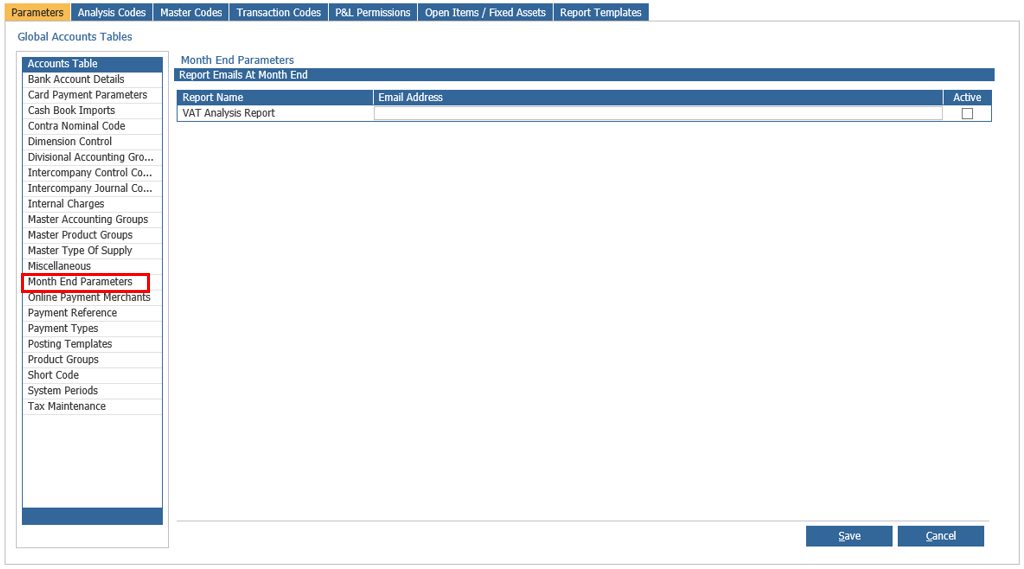
mceclip0.png

Now click on 'Email Address' and enter the the email address you would like to receive the report.

Related articles

  • 📝 Purchase Ledger Processing Remittances

Articles in this section

  • 📝 How to override Default Nominal codes set against a Purchase Ledger when posting an Invoice
  • 📝 How do I journal the balance on the Profit and Loss to the Balance Sheet?
  • 📝 How do I deallocate a Sales Ledger transaction in the Express Posting screen?
  • 📝 How to search a Sales Ledger and Purchase Ledger Invoice or Credit Note using a payment reference?
  • 📝 I am unable to allocate an invoice off my Purchase Ledger as it is not showing to be Allocated?
  • 🎥 How to add Settlement Days to all Purchase Ledger Master Accounts?
  • 📝Why is there no Default Purchase Type on the Purchase Ledger Transaction Account?
  • 📝 How can I re-create Remittances?
  • 📝 Why will the Contra Journal no longer allow me to add value?
  • 🎥 How to view a Nominal Code's Balance?

See all 130 articles

© 2025 All rights reserved. by Pinewood Technologies PLC