
A report is available within Nominal Ledger reporting named Allocation Log. The report provides detailed information on all allocations completed in the Sales Ledger, Purchase Ledger and Cash Book.
This allows easier tracing of allocation history for general reporting and for reconciliation purposes.
From the side menu select Accounts > Nominal Ledger > Reporting > Allocation Log.

The report may be filtered by the following criteria:
Allocation Group - A number given to a transaction involved in an allocation
Transaction ID - Transaction ID can be seen on the dark blue header bar at the top of the standard transaction drill down popup labelled as: ‘Item Ref’
Source - Workshop, Parts, Sales Ledger, Purchase Ledger etc. Account - Sales Ledger or Purchase Ledger transaction account
Run Number Range
Paid Run Number Range
Allocation Date Range
Transaction Value Range
Use the report filter options as required and click ‘Search’ to view results.
Each row on the report represents a transaction that has been selected during an allocation. These transactions are grouped to each allocation run by the ‘Allocation Group’ field number.
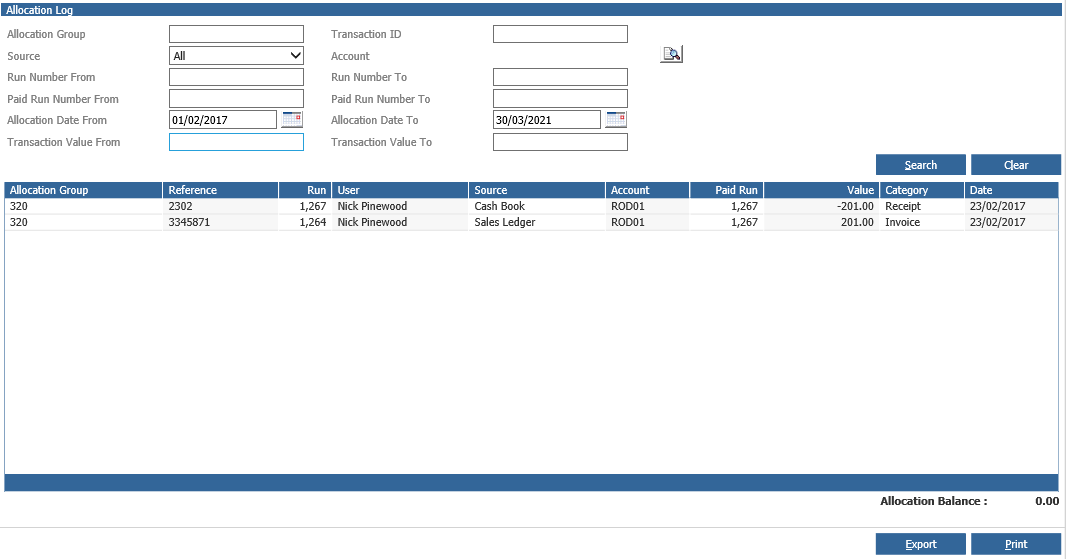
The on screen report provides the following display fields:
Allocation Group
Reference - Transaction Reference
Run - Transaction Run
User - System User who complete the allocation
Source - Transaction Source
Account - Transaction Account linked to the transaction
Paid Run - Paid Run Number
Value - Positive/negative applied dependent on transaction category
Category - Transaction Category
Date - Date allocation was completed
An ‘Allocation Balance’ field which displays the sum of all transaction values returned on the report displays in the bottom right hand corner of the report. Drill into a row and the ‘Allocation Log’ popup will appear detailing all other transactions with the same Allocation Group number. Drill again into a transaction and the standard transaction drill down report will display. The allocation log report can also be accessed from the ‘Allocation Log’ button on the standard transaction drill down popup.
This version of the report will only show allocations related to the transaction currently being viewed. This allows for all allocations related to any transaction to be viewed from with the transaction. From the Allocation Log screen click the ‘Print’ button to view a printout of the information displayed on screen.
Click ‘Export’ to download the data to Microsoft Excel. The export offers the following additional information:
Transaction ID
Account Type - Sales Ledger or Purchase Ledger
Transaction Period
Transaction Posting Date
The allocation report will not show write off transactions, discount transactions or transactions created from the partial allocation or partial payment of transactions. It will only show transactions selected during the allocation process.