Pinewood Technologies PLC Help Centre home page
Sign in
  1. Pinewood Technologies PLC
  2. Product Information
  3. Nominal Ledger

Search

๐Ÿ“ Balance Sheet

Jake
Jake
  • Updated 08 August 2024 10:44

Select the โ€˜Balance Sheetโ€™ report from the main menu.

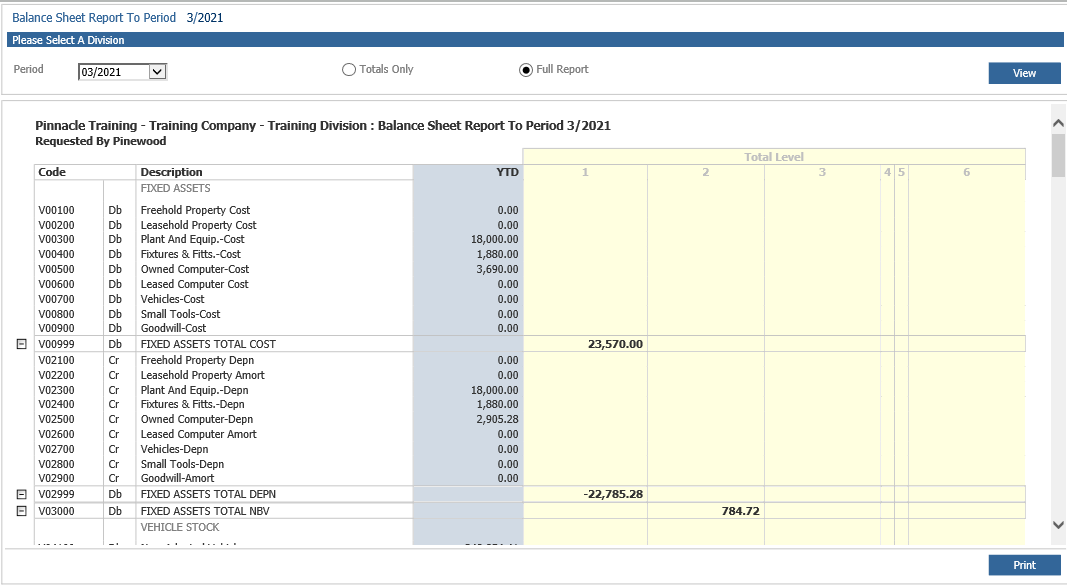
The selection screen appears. Select the accounting period for the report from the dropdown box. A โ€˜Totals Onlyโ€™ or a โ€˜Fullโ€™ report may be selected. Click โ€˜Viewโ€™ to display.

mceclip0.png

The report shows year to date values and can be printed. A historic record can be viewed by double clicking on a specific balance sheet code.


Related articles

  • ๐Ÿ“ Trial Balance
  • ๐Ÿ“ Purchase Ledger Processing Remittances
  • ๐Ÿ“ Reconciling Parts Valuation To The Stock Nominal
  • ๐Ÿ“ How Do I Add a New Vehicle Supplier?
  • ๐Ÿ“ Allocate & Receipt in a Parts Customer Order

Articles in this section

  • ๐Ÿ“ Nominal Ledger - Automatic VAT Clear Down Journal
  • ๐Ÿ“ Fixed Assets - Dimensions on Disposal and Depreciation postings
  • ๐Ÿ“ Adding Additional Payment Types to Payment Methods
  • ๐Ÿ“ Sales Ledger and Purchase Ledger Transaction Import File - Templates
  • ๐Ÿ“ Trial Balance by Analysis Code
  • ๐Ÿ“ Quarterly VAT Submission on Deposits
  • ๐Ÿ“ Nominal Journal - Posting to Dimensions
  • ๐Ÿ“ Accounts Process for Crediting an INTVM Invoice
  • ๐Ÿ“ Nominal Ledger Payment Practices - Data Export
  • ๐Ÿ“ Balance Reallocation Journal

See all 37 articles

ยฉ 2025 All rights reserved. by Pinewood Technologies PLC