Question
Nominal not set for selected tax category error message. How do I resolve this?
Answer
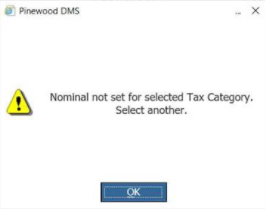
Nominal codes may display this message within Accounts > Nominal Ledger > Journal Entry > Journal.
You will be seeing this message because that nominal code is not set against the tax category selected.
You can see the Tax Category from the drop down at the top of the screen:
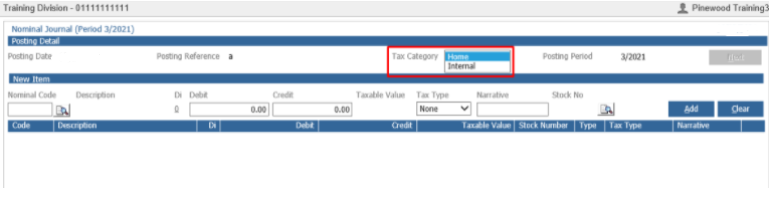
For example: If you have selected a tax category of internal but that nominal code is not set against the tax category of internal in the Tax maintenance parameters, you will receive the above error message.
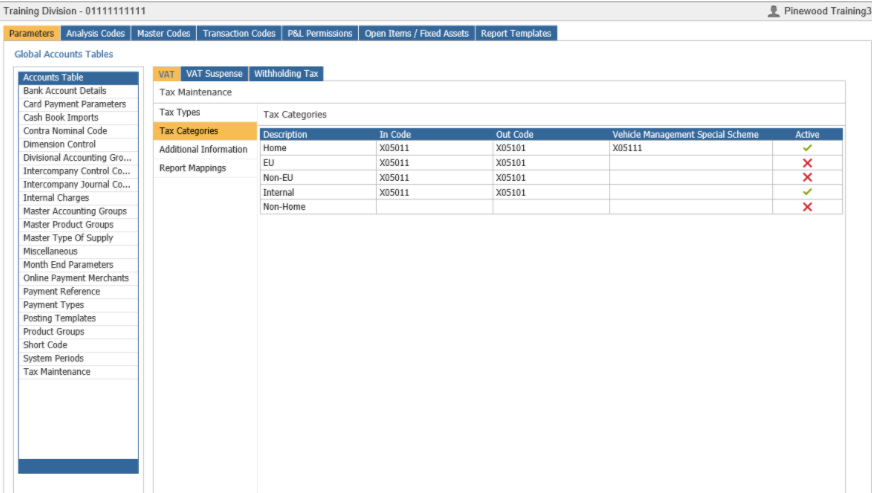
To view the Tax Maintenance Categories, you need to go to: Accounts > Nominal Ledgers > Ledger Parameters - Tax Maintenance - Tax Categories: