Pinewood Technologies PLC Help Centre home page
Sign in
  1. Pinewood Technologies PLC
  2. Quick Answers
  3. Parts

Search

πŸ“ How can I Bulk Delete Parts?

Ellie
Ellie
  • Updated 06 November 2024 11:38

Question

How can I Bulk Delete Parts?

Answer

Unfortunately you can not make a section of parts inactive. This will need to be done manually on the individual record for each part.

When running a stock take you can select to exclude parts with a zero stock holding:
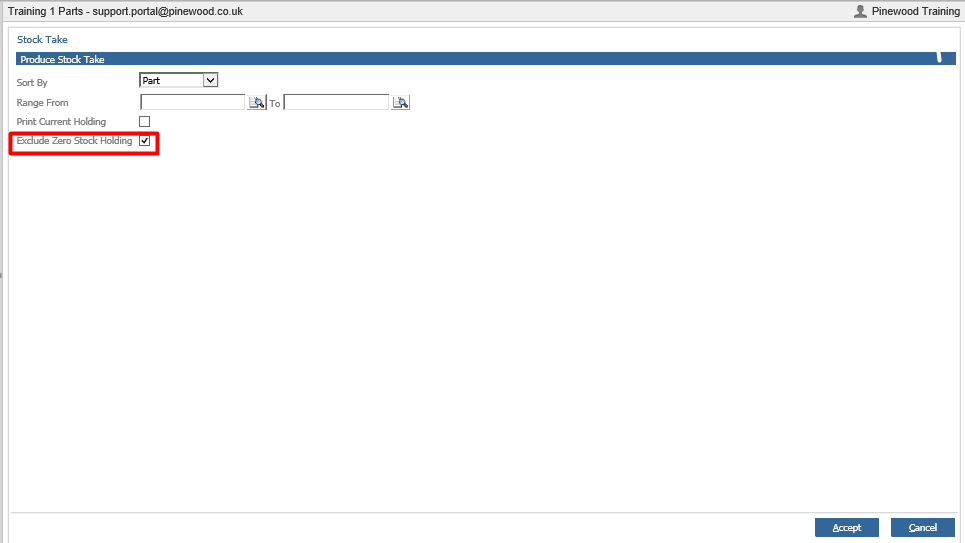
mceclip0.png

**Please Note: when running a stock take, the parts or the parts within the BIN Locations selected will become inactive during this time.**

Related articles

  • πŸ“Can I Delete a Part Record?
  • πŸ“ How do I Delete Bin Locations?
  • πŸ“ How do I Take Parts off a Workshop Job?
  • πŸ“ How to add a Discount to a Parts Customer Order?
  • πŸ“ Unable to Complete Stock Take - Check Locked Pages

Articles in this section

  • πŸ“ How To Refund A Retained Parts Deposit?
  • πŸ“ Why is the Add/Remove Part button not showing on Parts Supplier within the Receipts > Ordered screen?
  • πŸ“ How do I resolve the '!DOCTYPE html' error message when completing a Parts Stock Take?
  • πŸ“ How Do I Manually Change the Parts Price?
  • πŸ“ How Do I Amend a Part's Product Group?
  • πŸŽ₯ How to check all Parts are Active?
  • πŸŽ₯ How to amend Parts Pricing to Cost Plus on Specific Account?
  • πŸ“Why Is The Part Average Cost Incorrect
  • πŸ“How To Search Inactive Parts When Receiving 'Please Ensure All Parts Are Active' Message
  • πŸ“ How To Amend Parts Pricing To 'Cost Plus' On A Specific Account?

See all 129 articles

Β© 2025 All rights reserved. by Pinewood Technologies PLC