Pinewood Technologies PLC Help Centre home page
Sign in
  1. Pinewood Technologies PLC
  2. Quick Answers
  3. Parts

Search

📝 How do I Change Parts End Of Day Email Address?

Jake
Jake
  • Updated 26 July 2024 15:51

Question

How do I Change Parts End Of Day Email Address?

Answer

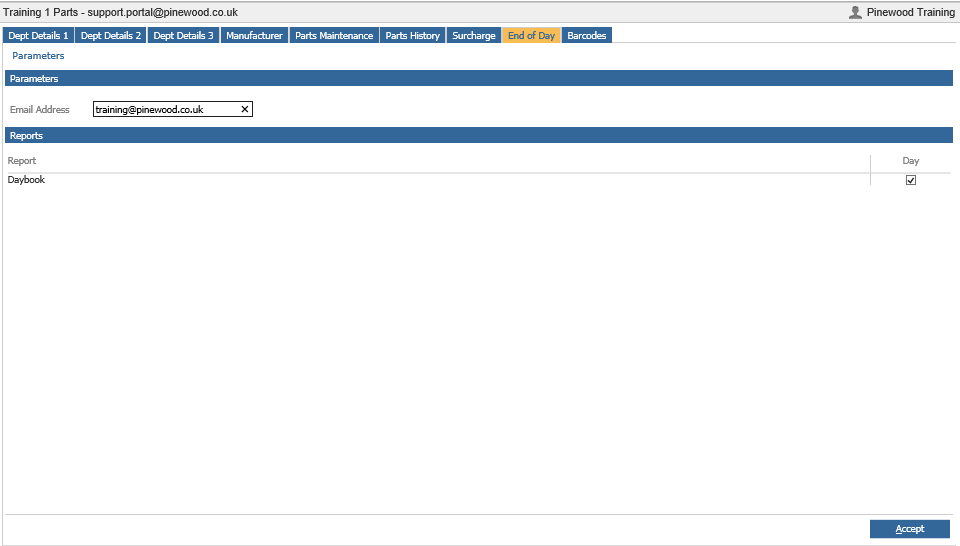
To change the Parts End of Day Email address you will need to go to Parts > Parameters > Department Details then click the End of Day tab.
mceclip0.png

To amend the email address click into the box, delete the unwanted email address, type the new address in and click Accept


Related articles

  • 📝 Parts Parameters End of Day
  • 📝 Changing Company, Division, Branch and Department email addresses
  • 🎥 How to add additional users to receive the Workshop End of Day Report Email?
  • 📝 Workshop Parameters Email Reports
  • 📝 How to add a Discount to a Parts Customer Order?

Articles in this section

  • 📝 How To Refund A Retained Parts Deposit?
  • 📝 Why is the Add/Remove Part button not showing on Parts Supplier within the Receipts > Ordered screen?
  • 📝 How do I resolve the '!DOCTYPE html' error message when completing a Parts Stock Take?
  • 📝 How Do I Manually Change the Parts Price?
  • 📝 How Do I Amend a Part's Product Group?
  • 🎥 How to check all Parts are Active?
  • 🎥 How to amend Parts Pricing to Cost Plus on Specific Account?
  • 📝Why Is The Part Average Cost Incorrect
  • 📝How To Search Inactive Parts When Receiving 'Please Ensure All Parts Are Active' Message
  • 📝 How To Amend Parts Pricing To 'Cost Plus' On A Specific Account?

See all 129 articles

© 2025 All rights reserved. by Pinewood Technologies PLC