Pinewood Technologies PLC Help Centre home page
Sign in
  1. Pinewood Technologies PLC
  2. Quick Answers
  3. Parts

Search

📝 How would I allow Negative Issue of Parts?

Jake
Jake
  • Updated 26 July 2024 15:54

Question

How would I allow negative issue of parts?

Answer

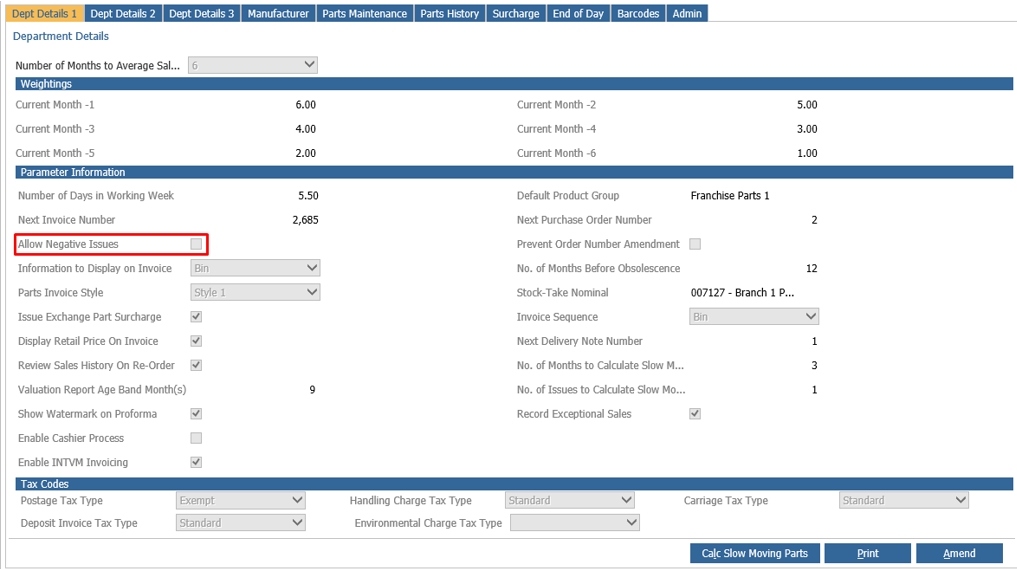
To allow negative issue of parts you will need to go to Parts > Parameters > Department Details > Dept Details 1.
mceclip0.png

Click Amend and then tick the box called 'Allow Negative Issues' located under Parameter Information.


Related articles

  • 📝 Perpetual Stock Take
  • 📝 Can a Technician log into two different workshops?
  • 📝 Workshop Parameters Loan Cars
  • 📝 Stock+ - Stocktake
  • 📝 How Do I Amend a Part's Product Group?

Articles in this section

  • 📝 How To Refund A Retained Parts Deposit?
  • 📝 Why is the Add/Remove Part button not showing on Parts Supplier within the Receipts > Ordered screen?
  • 📝 How do I resolve the '!DOCTYPE html' error message when completing a Parts Stock Take?
  • 📝 How Do I Manually Change the Parts Price?
  • 📝 How Do I Amend a Part's Product Group?
  • 🎥 How to check all Parts are Active?
  • 🎥 How to amend Parts Pricing to Cost Plus on Specific Account?
  • 📝Why Is The Part Average Cost Incorrect
  • 📝How To Search Inactive Parts When Receiving 'Please Ensure All Parts Are Active' Message
  • 📝 How To Amend Parts Pricing To 'Cost Plus' On A Specific Account?

See all 129 articles

© 2025 All rights reserved. by Pinewood Technologies PLC