Pinewood Technologies PLC Help Centre home page
Sign in
  1. Pinewood Technologies PLC
  2. Quick Answers
  3. Parts

Search

📝 How do I add an Alternative Address onto a Delivery Note?

Ellie
Ellie
  • Updated 26 July 2024 15:01

Question

How do I add an alternative address onto a delivery note?

Answer

Upon creating a customer order, when you click 'order' a pop up will appear:
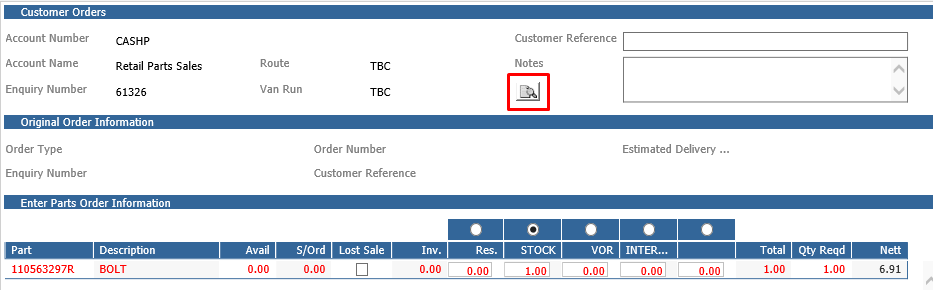


You will need to click the search icon which will bring up another pop up allowing you to do a postcode look up for you alternative address.
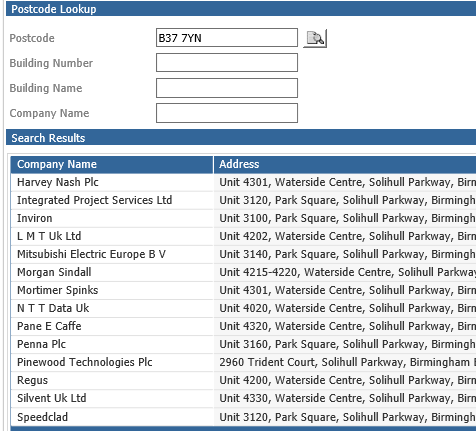


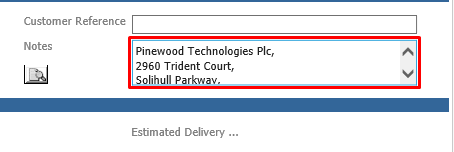
Upon selecting the appropriate address, it will put this in the 'notes' section which will be printed on the deliver note.
 

Related articles

  • 📝 Why Can't I Issue an In Stock Part?
  • 📝 How do I change the address on a Sales or Purchase Ledger Account?
  • 📝 How can I change the Purchase Values of a Used Vehicle?
  • 📝 Distribution Reporting
  • 📝 Distribution Delivery Cash Sale Available Parts

Articles in this section

  • 📝 How To Refund A Retained Parts Deposit?
  • 📝 Why is the Add/Remove Part button not showing on Parts Supplier within the Receipts > Ordered screen?
  • 📝 How do I resolve the '!DOCTYPE html' error message when completing a Parts Stock Take?
  • 📝 How Do I Manually Change the Parts Price?
  • 📝 How Do I Amend a Part's Product Group?
  • 🎥 How to check all Parts are Active?
  • 🎥 How to amend Parts Pricing to Cost Plus on Specific Account?
  • 📝Why Is The Part Average Cost Incorrect
  • 📝How To Search Inactive Parts When Receiving 'Please Ensure All Parts Are Active' Message
  • 📝 How To Amend Parts Pricing To 'Cost Plus' On A Specific Account?

See all 129 articles

© 2025 All rights reserved. by Pinewood Technologies PLC