
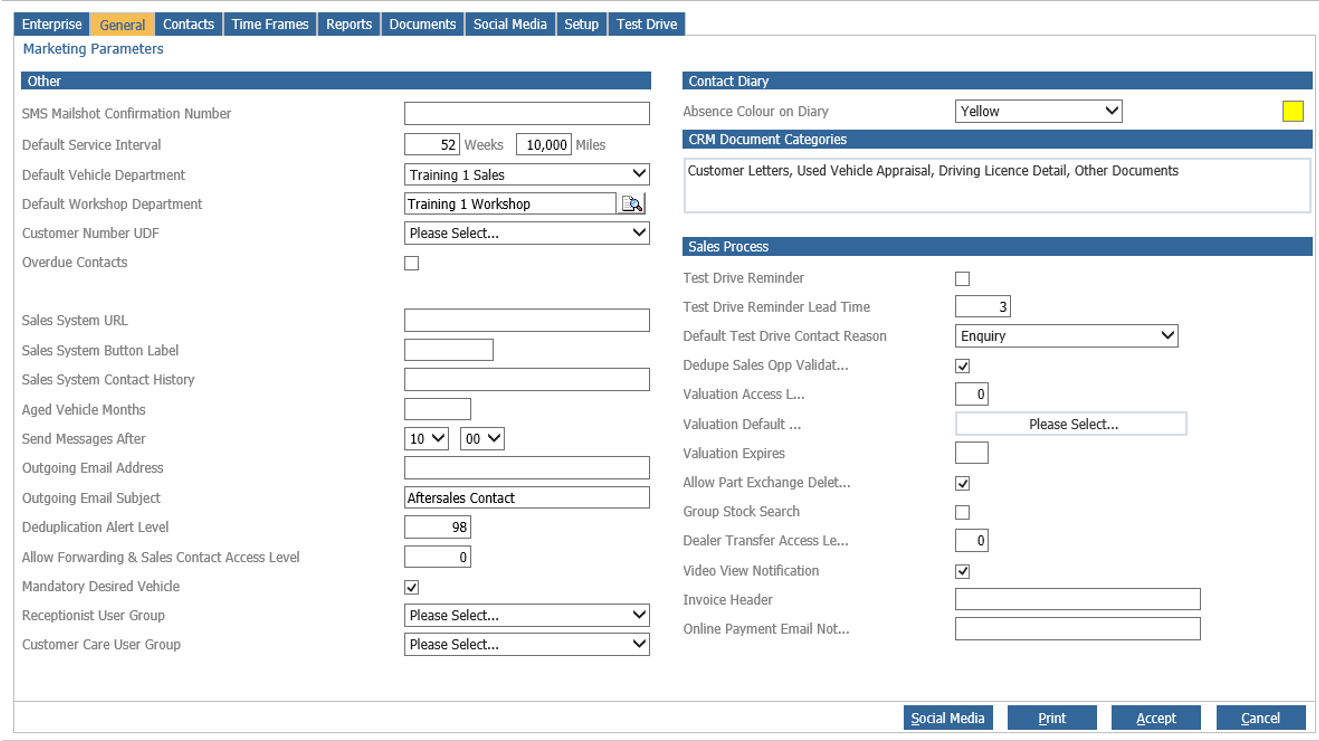
Upon accessing the Dealer Parameters, select the General tab displayed at the top of the
screen. This section of parameters is used to set branch marketing parameters. Upon selection
of the General tab, the screen displays as below.
Other
Within the ‘Other’ section on this screen, the SMS Mailshot Confirmation number will be used
by the system to send a confirmation text message to when the SMS message mailshot
functionality is used.
The Default Service Interval should be completed with the number of miles and weeks to be
used by the system for all vehicles. Complete the fields with the values required. This
parameter will be used for all vehicles that have the service reminders flagged checked within
the CRM record, but do not have individual defaults set. This default can be changed for
individual vehicles if required via the Service Details tab within the CRM record.
The ‘Default Vehicle Department’ dictates to the system the department within the company
structure to use when a marketing record is created on the system via the sale of a new vehicle.
The “Default Workshop Department’ is used when a customer is contacted via the aftersales
diary and declines the system will indicate which departments Customer retention report the
information will populate.
Completion of the ‘Customer VAT Number UDF’ activates the field specified to become a
mandatory field on every CRM record created on the system. It has been designed for
compliance with South African VAT requirements and should be left as its default display for
UK customers.
The Sales System URL button allows a link to be created to a third party site, for example FSA,
for recording customer data with the Financial Services Authority.
The Sales System Button Label determines the name of the button created within the Customer
tab of the CRM record and the Sales System Contact History populates the text which appears
in the Contact tab history notes when used in conjunction with the function button.
The Deduplication Alert Level parameter indicates at what level a user would see the prompt as
to whether a customer record is a potential duplicate record.
Mandatory Desired Vehicle when ticked will prompt the user to add desired vehicle details when
completing the sales opportunity information screen
Receptionist User Group - one user group from a list of all user groups created can be selected.
This group will be used to filter the Contact Activity report when the
‘Receptionist Only’ filter has been applied. Therefore the report will only display contact activity
that has been added by a user who belongs to the user group specified in the parameter
Customer Care User Group - allows the selection of a group of users who specifically deal with the
customer care routine.
The Allow Forwarding and Sales Contact access level is no longer relevant due to the introduction of the Data Protection parameters (covered in other Articles).
Contact Diary
Within the Contact Diary section, a colour description can be entered into the box to help
identify any absences within the sales team. These absences can be viewed within the CRM
Contact Report.
CRM Document Categories are used to control the documents that can be stored against a CRM record. If documents are to be stored, at least one document category should be created. Documents to be stored may include such items as part exchange appraisal forms, copies of
driving licenses or Demonstration Authorisation forms, or complaint letters. However, this list
is not exhaustive, and any documentation required by the dealership can be stored here.
To create a Document Category, click in the link CRM document Categories field. Once this
field has been accessed, a new window is presented. Any existing document categories are
displayed. To create a new document category, select the “Add New” option. Complete the
description of the document category and then click ok. The new category is then displayed.
Select ok to close the category window.
Select “Accept” to confirm the changes made. The “Print” option can be used to print out all of the
parameters displayed on this page. Cancel will refresh the screen and cancel any changes.
The test drive reminder process is an optional feature that can be enabled at division level.
The default setting will be disabled. When the Test Drive Reminder parameter is set the
associated Lead Time parameter can be set which will determine the delay (after a Sales
opportunity has been created) before the salesperson is re-prompted to offer a test drive if
one hasn’t been taken (assuming that the sales opportunity hasn’t progressed beyond this
point).
The Dedupe Sales Opp Validation is a divisional parameter and as a default will be enabled.
As part of the deduplication routine, with this parameter set, a duplicate record that is a
current sales opportunity will have to be made the preferred record before a merge can take
place. Without this parameter selected, a merge can take place where the duplicate record is
a sales opportunity, which will in turn close the sales opportunity for that customer. It is
recommended that this parameter is left as ticked, particularly if there is any lead
management integration.
The Valuation Access Level, Default User and Expires all work together with the part
exchange valuation process, when selecting the ‘Appraisal Date’ field on the vehicle
marketing record the appraisal pop up is displayed to print a part exchange appraisal form for
the vehicle.
Offer value can be made depended on the users access level and that of the valuation
parameter, if the user does not have sufficient access a pop up will display a request for
valuation populated with a default user if the parameter is set, finally the Expires dictates how
long this valuation will stand, please note while a valuation is valid the value is fixed to that of
the valuation when adding the vehicle as part exchange to a customer order.
Call History Days to Search; this parameter is no longer used.
Allow Part Exchange Deletion: During the sales process if a customer becomes a lost sale the
option to delete a customer’s part exchange vehicle is available. By deleting the vehicle the
customer will not be followed up for service and MOT reminders in the future for that vehicle.
Group Stock Search: By ticking this option allows a user to search group stock during the sales
process. This if their access level is the same as the Dealer transfer access level. An order can
be created on a vehicle in another part of the group.
Dealer Transfer Access Level: Used in conjunction with the Group Stock Search option.
Video View Notification. When enabled, the user who uploaded the video will receive an email notification to say the video has been viewed, the branch that it was viewed at, and the customer/company name.