
The Daybooks are a record of all transactions posted to the sales ledger in processing date order. Daybooks may be printed immediately after invoice postings or cash allocation, or re-printed at any time prior to month end being run. Daybooks should be used to check that posted invoices, credit notes and cash have been entered correctly. Purchase Ledger Daybooks can be produced by Run Number if required.
If a daybook is required relating to a particular Run Number or range of Run Numbers, complete the fields on the left hand side. Alternatively, leaving the run number blank will report all unprinted daybooks upon selection of the ‘Create Report’ option.
The report displays as shown below:
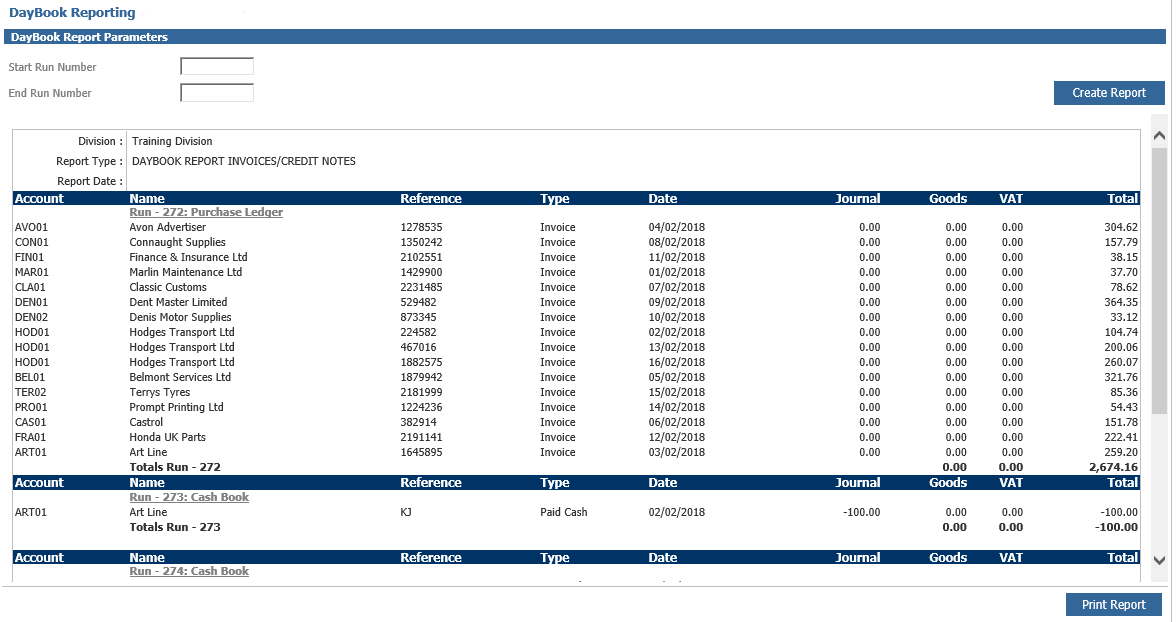
Each Daybook displays the purchase ledger account code and name, along with the Run Number related to the transaction. The invoice reference number is displayed, with the Transaction Type, Date and Values. The Daybooks can be re-printed by selecting the ‘Print Report’ option. The Daybook report is one of three reports which must be printed before the Purchase Ledger Month End Routine is completed unless the purchase ledger parameters have been set to not enforce this.