
Within Accounts > Purchase Ledger > Ledger Parameters – Transaction Parameters tab there are the Cheque Printing parameters, as below:
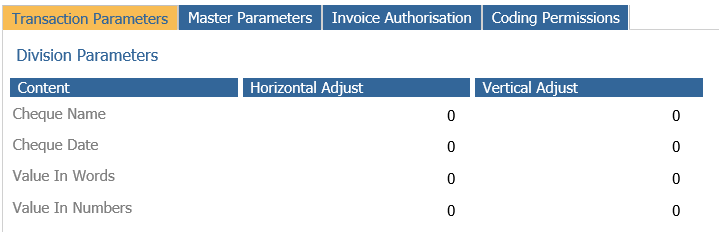
If you look at the below picture, we have 8 parameters to allow users to push the text to top, bottom, left, right.
Rules have been added to dictate how these work, please see below diagram and explanation.
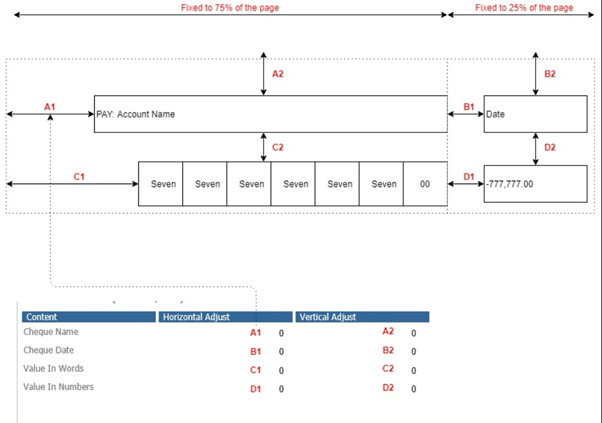
Some parameters are independent. Example:
- A2 and B2 are independent: means when you increase A2, it doesn’t affect B2. Same applies to B1 and D1. If you want to push account name a bit to bottom, and pull date a bit to top, you can set A1 = 2, B2 = -3.
- A1 and B1 are independent: because we already fix the left dotted section to 75% and right dotted section to 25% of the page.
Some parameters are not independent. Vertical adjustments are accumulated. Example:
- If you set A2 = 5, it pushes the account name 5 units down to bottom. But because the numbers in words are put after the account name, it also goes down 5 units.
- If you set B2 = -10, it pulls the date up 10 units. And because the number is put after it, it also goes up 10 units.
- If you set B2 = -10, D2 = 10, it pulls the date up 10 units and keep current position for the number
Last rule, for numbers in words, when you change C1, it also changes distance between the numbers as well.