Pinewood Technologies PLC Help Centre home page
Sign in
  1. Pinewood Technologies PLC
  2. Quick Answers
  3. Showroom

Search

πŸ“ Add Handover button not showing in My Orders

Ellie
Ellie
  • Updated 26 July 2024 15:49

Question

Why is the below Add Handover button not showing in the My Orders area of Showroom?

Answer

This will be due to the Handover Diary being turned off in CRM > Dealer Parameters and in Contacts Tab

In here you will need to select Contact Methods:
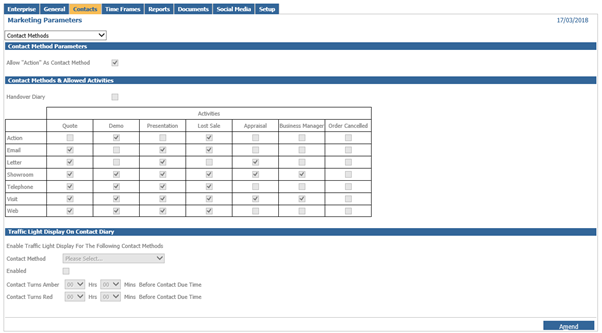
Click Amend and tick the Handover Diary, then save and this will then show the Add Handover button in the Showroom.


Related articles

  • πŸ“ How do I Create Handover Activities?
  • πŸ“ Pending Invoice INTVM
  • πŸ“ Why is the Delivery Button not Appearing?
  • πŸ“ How to add a Handover Appointment in Showroom?
  • πŸ“ Vehicle Price List Overview

Articles in this section

  • πŸ“ Why am I seeing an Invalid Part Exchange error message when stacking a deal?
  • πŸ“ Showroom > Offers - No Access error message
  • πŸ“ How to process Leads in Showroom?
  • πŸŽ₯ How to Create a Showroom User
  • πŸ“ I am to present a Finance Offer to a Customer where the Dealer owes the Customer Money - how do I resolve this?
  • πŸ“ How do I get the Remove Overdue Box to show?
  • πŸ“ How do I get the Finance Offer option under Additional Documents?
  • πŸ“ How to add a Handover Appointment in Showroom?
  • πŸ“ How to do a Lost Sale in Showroom?
  • πŸ“ Showroom - Next Contact

See all 25 articles

Β© 2025 All rights reserved. by Pinewood Technologies PLC