
Question
How to deactivate a user account?
Answer
First go to Administration > User Admin
Click on the Users tab
Then search for the user using the fields.
The press Search.
Double click on the user in the list and it will display the user's record.
Then select edit at the bottom of the screen.
Then changed the enabled box from "Ticked" to "Unticked" this will now deactivate the account, making it unable to be used.
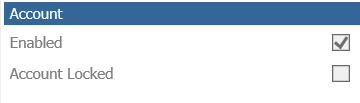
The account will now be inactive, but allow you to re-enable the user in the future so if they return to the company they don't need to be fully re-created on the system.
User records cannot be deleted from the system.
You can however choose to view the list to include or exclude inactive users using the below parameter when searching:
