
Question
I am trying to select a location on the Stock+ app, however when I select the location I receive the message: "You don't have access to data from *location selected*. You will need to grant access to this location in Pinewood DMS via Manage Location in User Admin."
How do I resolve this?
Answer
The reason this error occurs is due to the Home Location set against your User Account. As Stock+ displays Vehicle Stock, t your location will need to be set to your Vehicle Management Branch level in order to see this data.
To do this, please contact your Site Administrator and request that your access level is changed from Department level to Branch level.
This is done by going into the Administration module and selecting the user who needs access to the Vehicles area:
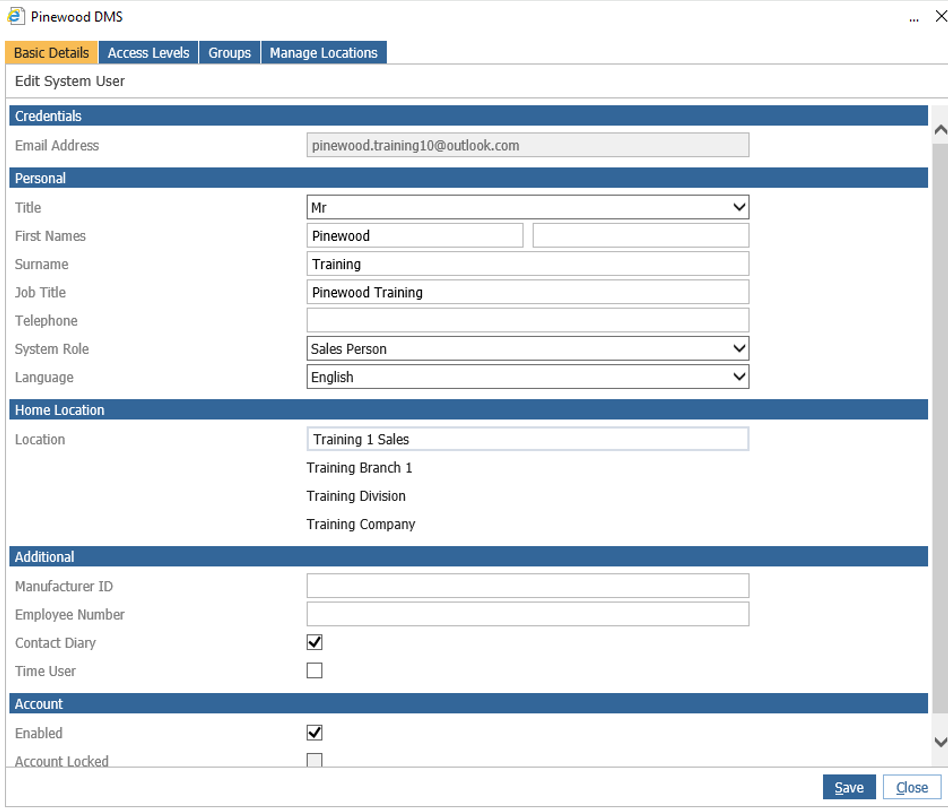
Click Edit and then click the Home Location box and change this to Branch level so the user can access this area in Stock+.
Please Note: Pinewood Support are unable to change the access level for users, this can only be done by Site Administrators.