Pinewood Technologies PLC Help Centre home page
Sign in
  1. Pinewood Technologies PLC
  2. Quick Answers
  3. CRM

Search

πŸ“ Remove Future Contact Access Level

Jake
Jake
  • Updated 29 October 2024 16:21

Question

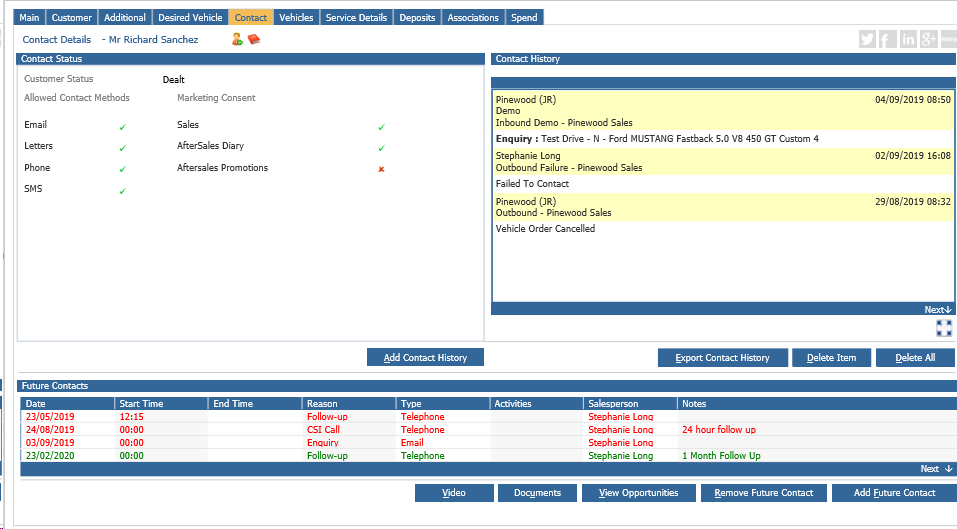
 How to remove future contact access level?

Answer 

The ability to remove future contacts is not governed by a parameter, it is built within the system (hard coded) and cannot be seen nor changed. Users with an access level of 60 or above will have the ability to do this (See the image below).
mceclip0.png


Related articles

  • πŸŽ₯ How to amend a Customer's Contact Preferences?
  • πŸ“ How do I get the Remove Overdue Box to show?
  • πŸ“ How do I Clear Overdue Appointments from the Contact Diary?
  • πŸ“How do I Delete a Customer CRM record?
  • πŸ“ Manage MFA for Pinewood DMS Users - DMS Set Up

Articles in this section

  • πŸ“ The email address entered may be invalid error message
  • πŸ“ I've created a New Letter but this is not updated in the Aftersales Contact Plan
  • πŸ“ How to run a selection to return Account Codes associated to a Customer record?
  • πŸ“ Users are able to search for Customer Records from Branches they do not have access to - Why is this?
  • When I click 'Start Contacts' in the Aftersales Diary, there are no contacts to process?
  • πŸ“ How do I search for Additional Names of customers?
  • πŸ“ How to change the Department on a CRM Record?
  • πŸŽ₯ How to amend the Vehicle Health Check format?
  • πŸŽ₯ How to set up the Demonstration Diary in CRM?
  • πŸŽ₯ How to Add an Additional Name to a CRM Record?

See all 143 articles

Β© 2025 All rights reserved. by Pinewood Technologies PLC