
Applying permissions to the automated communications from within the Vehicle contact plan process.
Within CRM > Parameters > Communications > Emails, within the Content Tab there is a list of categories of email.
Within the Process Mapping area of Data Protection, you are able to map against the email template and apply a consent category required for a specific email. If there is a template set within the Vehicle Contact plan, then you can ensure that any permissions required to send this to a customer can be confirmed and the email will only be sent if the correct permissions have been provided. The same applies to any Letters set within the Contact Plan. Any Letter templates can also be mapped with Consent Categories applicable to ensure these are only printed where permission has been allowed.
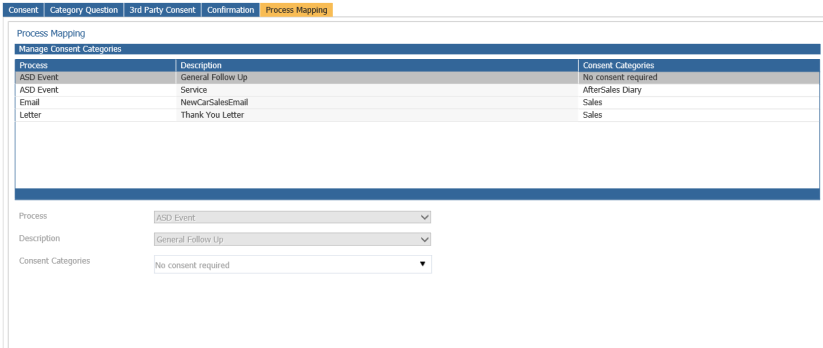
Within CRM > Parameters > Communications > Data Protection you are able to set the template with their correct Consent Categories. Within the example below, you can see that the email ‘Servicing your new car’, which is set within the Vehicle Contact plan has a Consent Category against it;
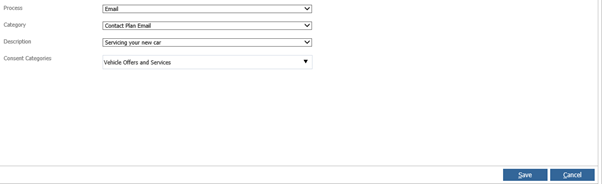
To set up a new mapping, you would select the New button, select the applicable process, select the Category, select the template email or letter required and then the Consent Category that is applicable to that form of contact;
The process is the same for Letter mapping, the difference being that you would select within Category if this is for Sales or Aftersales contact;
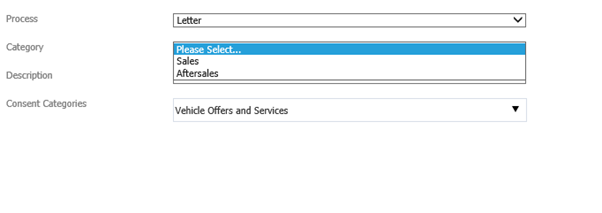
Within the Description you would then be presented with the available Letters that are held for the chosen Category.
Within Vehicles > Parameters > Contact Plans.
If there is a contact event set that has no Consent Categories mapped, this will look towards the customer’s allowable contact methods. If they have set to allow contact for that method, then this will send.
If a Consent Category has been mapped against a method of communication, then when the system comes to generate this contact it will check what permissions the customer has given, and whether this form of contact has been allowed.
As these are scheduled into the future, a second check is made by the system when generating the form of contact of letter or email. This may be that initially permission was given, however in the time between this a customer may change their permission for email for that Category to be received. This will ensure that the email is not sent to the customer in error.
Please Note; If a future contact is created into the future by Telephone, Letter or Email that is outside the Vehicle Contact Plan, then the contact will create regardless of any Permissions, and it will be down to the individual processing that contact to determine whether based on the permissions the customer has provided is allowed or not. This will be when viewing the future contact to see the permissions given as the system will not know the content of that contact unlike with Letter or Email templates where the content has Consent Categories mapped so can apply the correct permissions.