
If you are using external services outside of Pinewood DMS to manage Marketing content, the below details how to extract the data and add consent categories and apply what method of contact is downloaded.
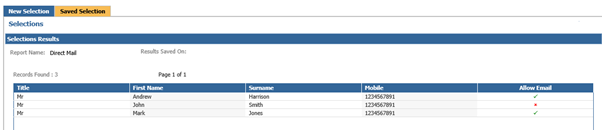
Within selections, view the below examples that show customers with the Allow Email contact.
There are two with this as allowed and one without.
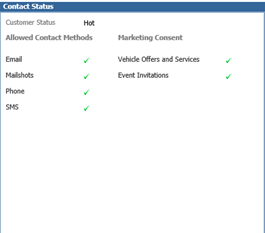
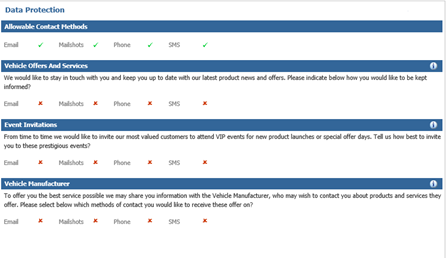
With this customer we can see that they have email as an allowable contact method, and also as a permission within the question for Vehicle Offers and Services which will be used for this example.
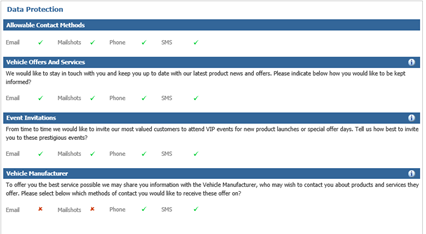
With the next customer we can see that they do not have email as an allowable contact method and therefore, no permissions for any further questions.
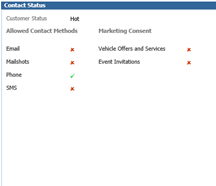
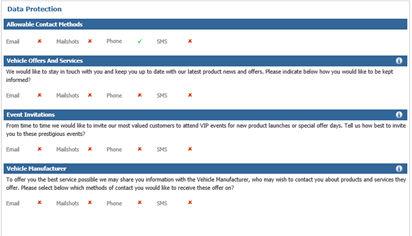
With the final customer we can see that email is an allowable contact method, but they have declined email as a permission for further contact as with our example the Vehicle Offers and Services contact category.
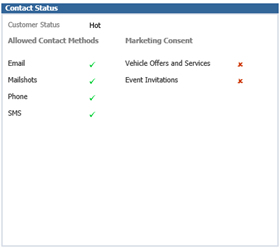
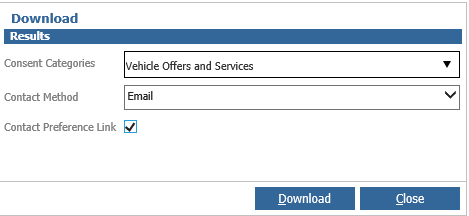
When downloading the results using the Download button, the window will display as below;
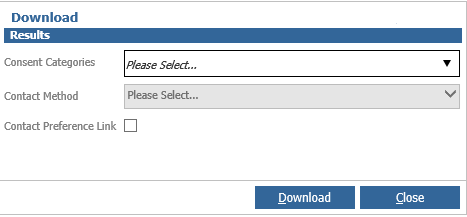
You can specify here if there are any categories required to be set for the particular extract.
For the below example, we will choose the Vehicle Offers and Services. This means that only customers who have given Permissions for this category will be extracted.
You can then also narrow the permissions given down further for the extract, by specifying the Contact Method. For the below example, we will state this is an email extract.
You can then also if required, select the Contact Preferences Link. If you would like to supply the link for customers to be able to amend their own permissions, you can then include this on the extract. This will then appear in the final column of the selections download.
Once downloaded, view the results and see from our example, that only one customer appears;

Only this customer appears due to the permissions allowed from the customer’s contact preferences as shown previously. You can also see the URL added in the last column so the customer has the option to amend their own preferences online.
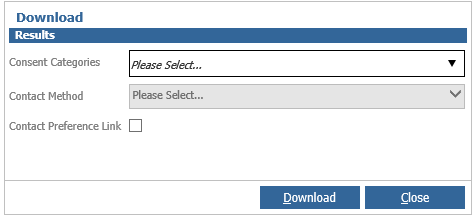
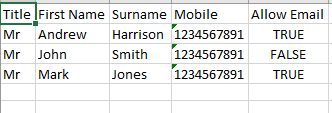
From the Download option, you can also leave the fields blank if no permissions are required and you can extract the file with no consent categories. From the example below, see all the customer examples have been returned as we have not set any permissions for consent against the extract required.
Please note; Only users who have the correct access level to download will be able to use this functionality.
This access level is set within CRM > Parameters > Dealer Parameters > Enterprise Tab > Selections Download Access Level.