
For some parts purchases, users may find that certain parts can only be purchased in ‘packs of 5’ or ‘packs of 10’ for example.
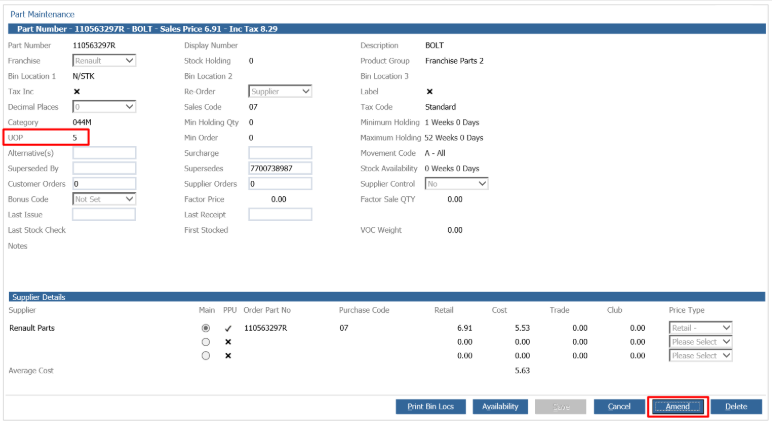
This can be set within Parts > Maintenance > Create/Amend and by searching for the desired part.
Once you are in the part record, by clicking amend you will be able to amend the UOP to the desired quantity (to 5 for example).
Now when you come to order the part within Parts > Sales > Invoice if you enter in your part number with a quantity of 1, the following message will pop up
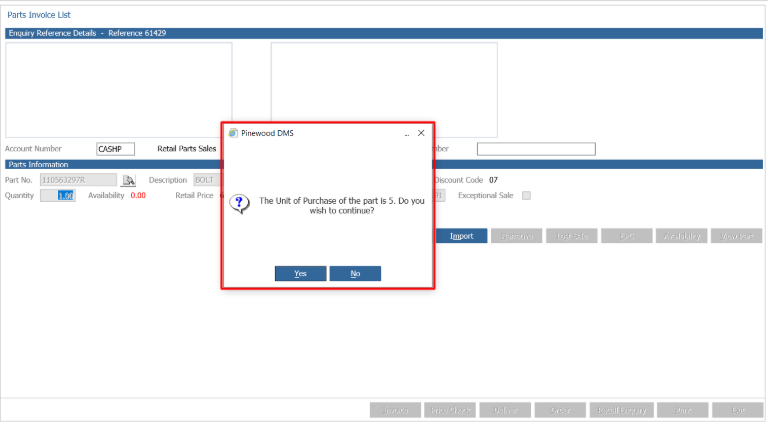
This pop up will ensure the user is aware that they may only need 1 quantity of the part but 5 will need to be ordered.
The user will now need to decide if they will be ordering a quantity of 5 when only 1 is required.
To help this decision to be made, the user can go into Parts > Maintenance > Create/Amend and look into the last receipt and if the last receipt was a considerable amount of time ago, it may not be worth ordering a part with a UOP of 5 as the other 4 parts may not be sold for some time.
If however, the user is ordering a quantity that is a multiple of the UOP then the pop up message will not arise.