
Before you can view the Imprest Stock Report for a specific branch, an imprest stock department must be created. This needs to be done from within the parameters for the main Parts department. (Please refer to Parts > Parameters > Imprest stock parts department for more info on how to do this.)
When the parts department has placed stock out at customers business, it may be useful to create an imprest parts department.
- An additional parts department would need to be added to the company structure along
- Parts product groups would need to be created
- The relevant parts department parameters/ setup would need to be completed
Once the set up is complete, the relevant parts can be moved from the main parts department to the imprest parts department using the internal transfers process.
With the stock now in the imprest department, parts should be reserved against the relevant customer sales ledger account within the imprest stock department.
With the setup complete the imprest stock report can be used, within the main parts department.
To view this report you will need to go to :
Parts > Reporting > Sales > Imprest Stock Report
Once a date range and sales ledger account code has been entered, the report can be generated.
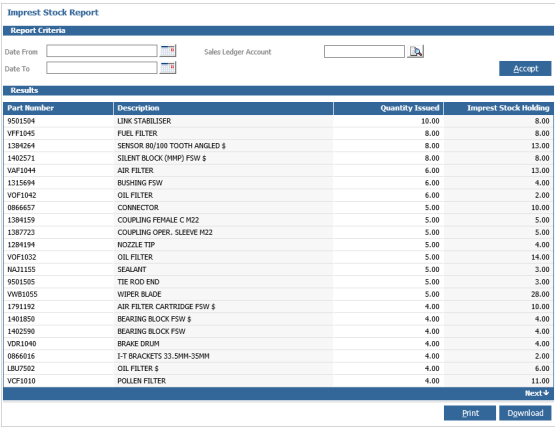
The report will show the part quantity's that are reserved against the sales ledger code with the imprest stock. Quantity is issued to the same sales ledger code from the main parts department.
If you double click on a part record it will take you to view that part.