Pinewood Technologies PLC Help Centre home page
Sign in
  1. Pinewood Technologies PLC
  2. Product Information
  3. Parts

Search

πŸ“ Valuation Report

Ellie
Ellie
  • Updated 06 August 2024 11:11

The Valuation report is found in Parts > Reporting > Valuation > Valuation 

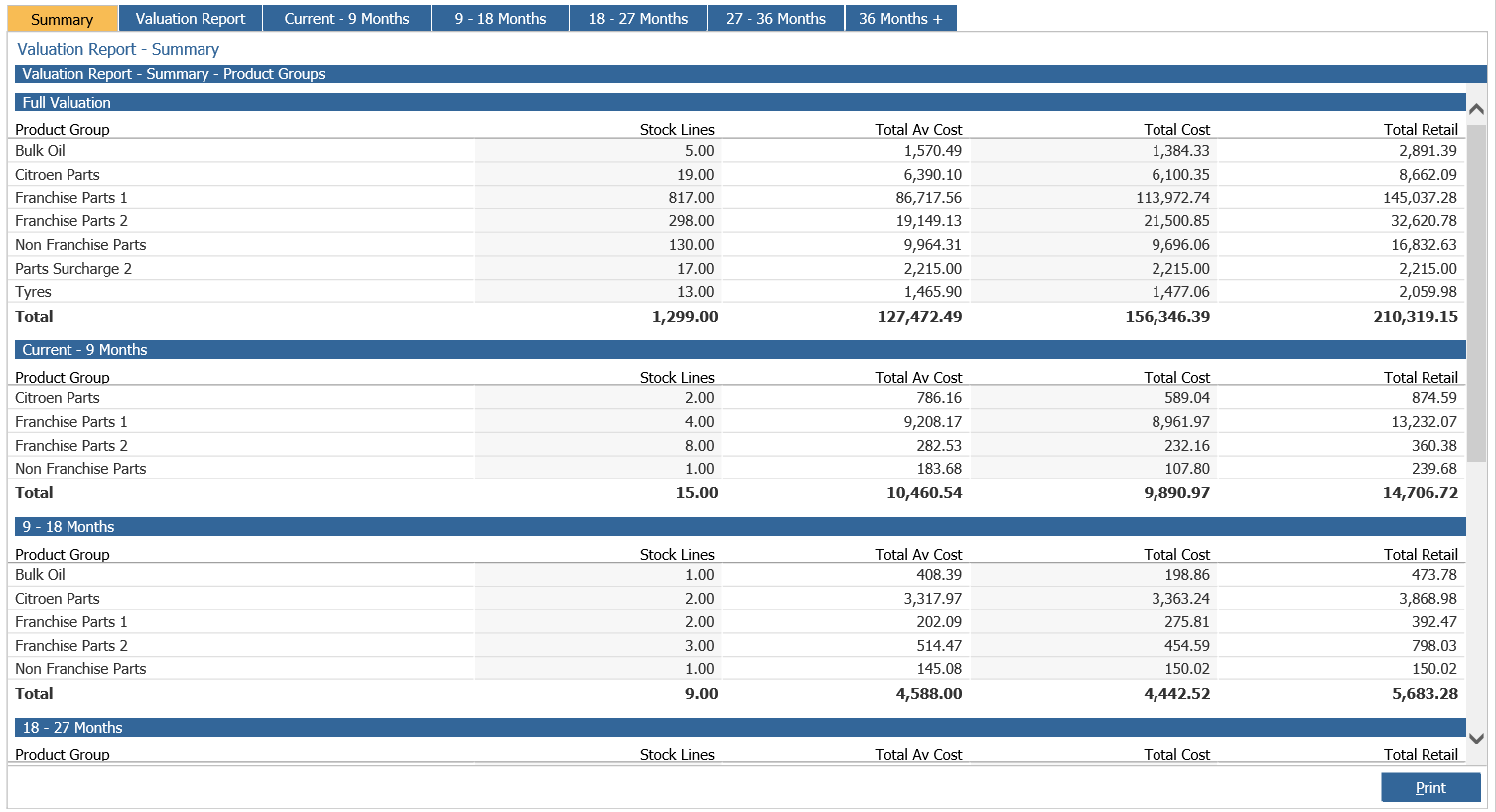
The Summary displays totals by the different age bandings.

The Valuation Report displays the total valuation of the parts held within the parts department.

The report is then broken down into individual reports one for each age band.

The age banding for the report is selected within Parts > Parameters > Department Details > Dept Details 1
mceclip0.png

Related articles

  • πŸ“ Reconciling Parts Valuation To The Stock Nominal
  • πŸ“ How do I Amend the Months shown on the Valuation Report?
  • πŸ“ Parts Reporting GINR
  • πŸ“ Cash Book – Express Posting
  • πŸ“ Bumper (ASF) Finance Integration for Vehicle Health Checks

Articles in this section

  • πŸ“ Parts Customer Order With Deposit Invoice
  • πŸ“ Disable GRNI for Surcharge Parts
  • πŸ“ Export Part Details
  • πŸ“ Parts Retail Price Amendment during Receipting
  • πŸ“ Parts Selections - Saved Selections will only be stored for 90 Days
  • πŸ“ Reconciling Parts Valuation To The Stock Nominal
  • πŸ“ Locked Till for EPOS
  • πŸ“ Why is the Delivery Button not Appearing?
  • πŸ“ Creating A Parts Selection For Sales History
  • πŸ“ Creating A Parts Selection For Stock Holding

See all 106 articles

Β© 2025 All rights reserved. by Pinewood Technologies PLC