
Question
How do I edit a HTML email template?
Answer
The email templates are setup within CRM > Parameters > Communications > Emails – Content Tab
Here you will have a category drop down menu to select the type of email you want to edit. For this example, I am going to be using the “Health Check Email” but the process would be the same for all just with different content.
When you first open the email you will see the HTML that stands for ”Hypertext Markup Language” that is used to create the email template that can be viewed by going into the Preview tab.
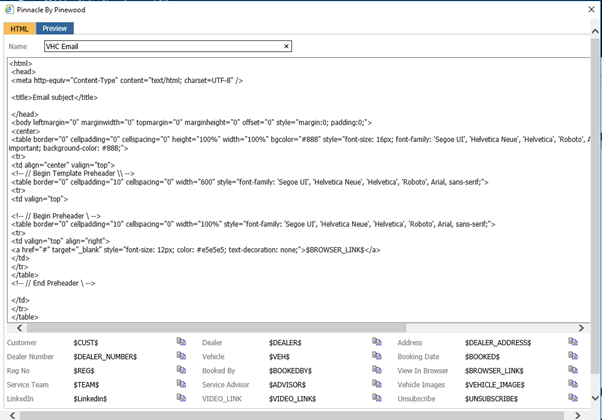
We recommend for editing this template to copy all of the HTML out of Pinewood DMS and pasting into an external editor such as Note Pad, Note Pad++, Sublime or VS Code.
From here you will have a much easier time locating the element that you need to change.
In this example I am using Note Pad as it is installed on every PC by default.
Now that you have all of the HTML code in a text editor you can now Use the “Ctrl + F” command to search the document for the element that you need to change.
In this example I am going to change the Dealer Principles name from “Joe Bloggs” to “John Doe”
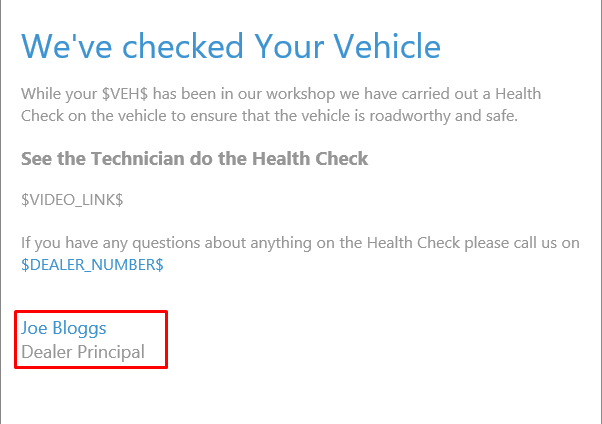
By pressing “Ctrl + F” in the Note Pad and entering the name “Joe Bloggs” the editor will find what we need to edit for us.
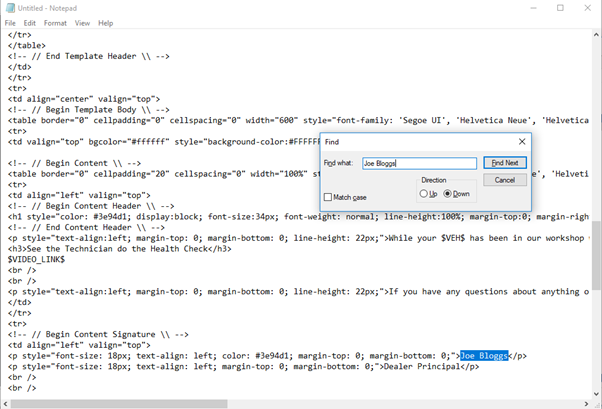
Here I close the Find window and change the highlighted text to read “John Doe”
At this point I have made the change that was needed so I press “Ctrl + A” and then “Ctrl + C” to select all text in the editor and copy it.
I then paste this back into the DMS screen overwriting the existing HTML code.
Now when you go back to the preview tab you will see that the change has been made.
This method can be used to update a majority of the text that appears on this email.
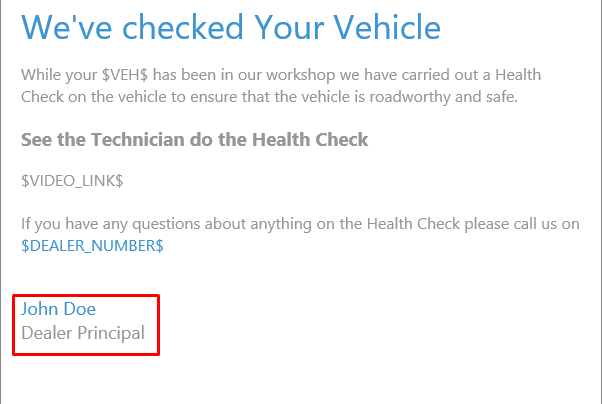
If you have no got the required result you can click” Cancel” which will close you out of the current screen without saving anything that you have done. If have the require result you will want to click Accept which will save the email template.